As there are more and more audio and video equipment in the home, the number of remote controls is gradually increasing, and each switch is a big project.
In order to solve this problem, the HDMI Association developed CEC technology, which can use a single remote control to control multiple devices, greatly simplifying the operation method and improving the user experience.

Have you ever encountered the following situations in your life?
After a busy day at work, I want to go home and watch a movie to relax.
At this time, you need to take out several remote controls, turn on the TV, set-top box, and stereo one by one and set the programs.
Sometimes you may not even be able to find the remote control, which can be frustrating and frustrating.
However, if the audio and video equipment used supports the CEC function, the situation will be very different, and the above annoying problems will no longer exist.
Let us take a look at what magical technology CEC is!
What is HDMI CEC? How to use it?
The full name of CEC is Consumer Electronics Control. It is a technology and function developed by the HDMI Association.
Specifically designed for HDMI interface. The original intention of the design is to enable consumers to use "one" remote control to control and operate all HDMI connected devices, simplifying the operation of complex audio and video equipment (such as home theaters, etc.), and giving users a more convenient life experience.
Taking the currently common One Touch Play function as an example, if a set-top box and a TV that support the CEC function are used at the same time, the user only needs to press the power-on button of the set-top box, and the TV will turn on and automatically switch the input port to play the audio and video content of the set-top box. Doesn't this sound amazing?
In order to control multiple audio and video equipment, a complete and consistent set of transmission protocol specifications is required.
Currently, the HDMI Association has released two versions of the CEC specification, namely CEC 1.4 and CEC 2.0. CEC 2.0 is expanded based on CEC 1.4 version. Although it supports more functions, it adopts the same entity and protocol architecture in principle.
HDMI CEC transmission architecture and principle
Introduction to CEC technology entity layer
CEC is a single-wire two-way communication technology. Only a single CEC pin on the physical layer is needed to communicate with all connected devices. On an HDMI connection network, the CEC line design between devices requires connection. Therefore, regardless of whether HDMI products support CEC functions, they need to be equipped with CEC pins and meet specific electrical specifications to ensure that even if a device that does not support CEC is connected to the network, other devices can still operate normally.
For HDMI devices that do not support the CEC function, in addition to the correct transmission of HDMI audio and video data, the CEC capacitance, resistance, and voltage must also meet the specifications in order to be certified as a qualified HDMI device.
The following are the relevant CEC line electrical specifications:
1. In order to prevent the connecting device from causing excessive capacitive load on the line, the maximum allowable capacitance of Source (sending end) products is 150pF, and that of Sink (receiving end) products is 200pF.
2. Generally speaking, if the product has multiple HDMI input terminals (such as a TV), the CEC lines between the input terminals must be connected (for example: the resistance value between input terminal 1 and input terminal 2 needs to be less than 5 ohms). If the product has multiple output terminals, their CEC lines cannot be connected (for example, the resistance value between output terminal 1 and output terminal 2 needs to be greater than 1M ohm). If the product is a Repeater type, design the CEC line connection between the output end and the input end depending on whether it is a CEC_Root_Device.
3. When the product is powered off, the leakage current on the CEC line needs to be less than 1.8uA. And regardless of whether the product is on, off, or in hibernation (if supported), the voltage on the CEC line needs to be maintained within a specific range under external pull-up or pull-down test conditions (Table 1).
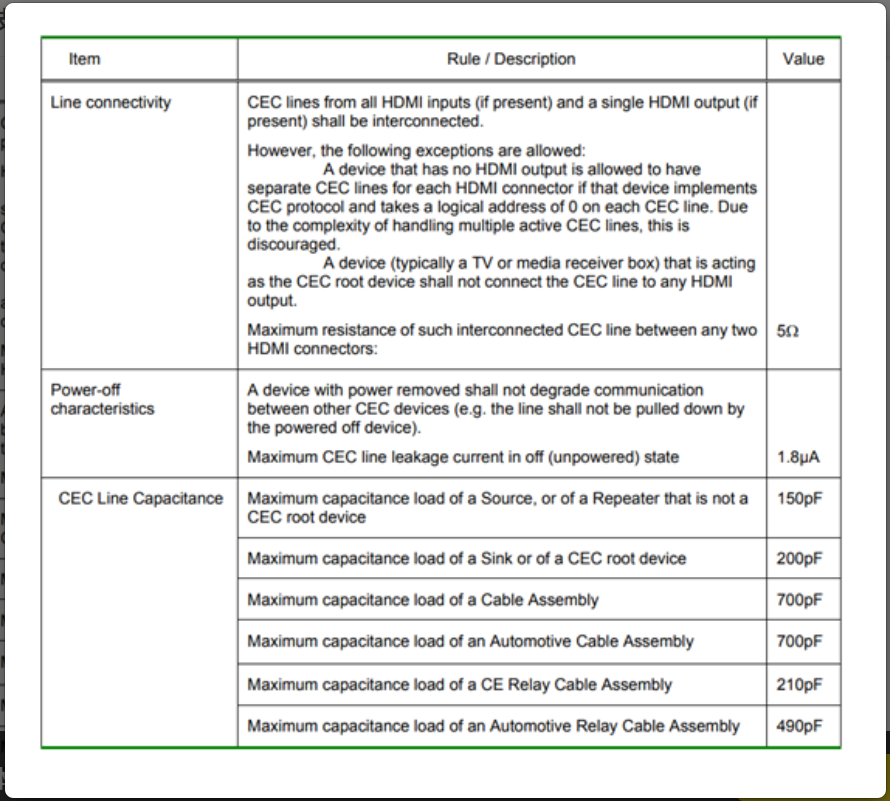
Table 1: Electrical specifications that products that support HDMI CEC must comply with (first three points) (Data source: HDMI Spec 1.4b)
4. If the product supports the CEC function, in order to ensure that the product can output the correct CEC signal, in addition to meeting the three specifications mentioned above, it also needs to comply with the specifications in Table 2. When the CEC line is in idle state, the line voltage must be pulled up to 2.5~3.63V through a 27k ohm resistor to maintain the logic 1 state. After starting to transmit information, the line voltage needs to be lowered to 0~0.6V to represent logic 0. In addition, CEC is not a high-speed transmission interface, and the rise and fall time requirements are less than 250us and 50us respectively.
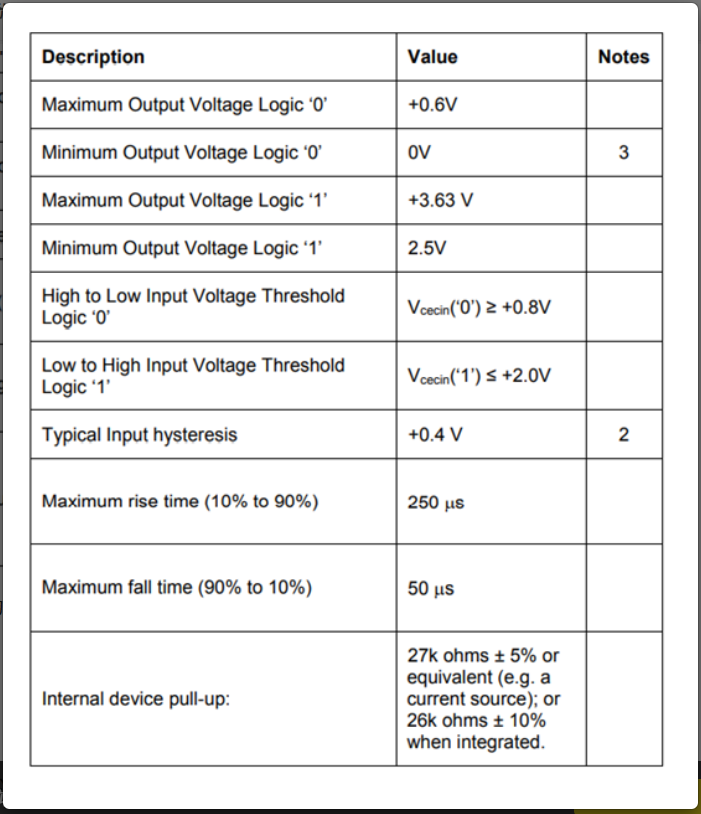
Table 2: Electrical specifications that products supporting HDMI CEC must comply with (point 4) (Data source: HDMI Spec 1.4b)
Introduction to CEC technology protocol layer
The CEC transmission process usually requires an Initiator and one or more Followers. Initiator is responsible for transmitting signals, and Follower is responsible for receiving signals. A complete CEC signal is composed of many bits when viewed enlarged, and the bits can be further subdivided into Start bit and Data bit.
. Start bit format: When the Initiator does not transmit CEC messages, the CEC line is logic 1; when it wants to start transmitting messages, it will pull the line low to logic 0 (Figure 1). The format of the Start bit is only used here. After the Follower receives the message in this format, it will be ready to receive subsequent data bits.
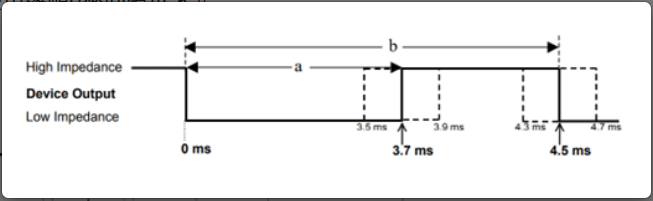
Figure 2 HDMI CEC Data bit format (Source: HDMI Spec 1.4b)
Header/Data Block format: Every 10 Data bits can form a larger unit, called Header/Data Block (Figure 3).
The first eight Information bits can be used to transmit Data, Logical address, Opcodes and other information according to the purpose.
The last two EOM and ACK bits have the following uses:
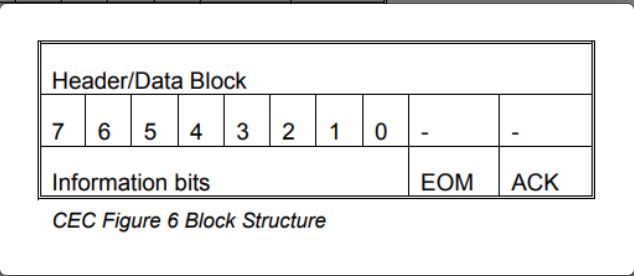
Figure 3 Header/Data Block format (Data source: HDMI Spec 1.4b)
(1) EOM (End of Message): Used to tell the Follower whether this is the last data block to be transmitted. 1 means that the message has been transmitted, and 0 means that there is still data to be transmitted in the future.
(2) ACK (Acknowledge): The Initiator always sets ACK to 1, and the Follower will respond to whether the information is successfully received by replying ACK. Note that Follower will have different reply methods to ACK due to different transmission modes (Direct/Broadcast). If the initiator transmits a message to a single follower, this type of message is called a direct message. The follower can set ACK to 0, which means the message is received correctly. If the initiator transmits a message to multiple followers, this type of message is called a broadcast message. The follower can set ACK to 0, which means the message was not received correctly. Therefore, when the Initiator detects that the ACK is 0, it may mean that one or more followers have not successfully received the message; conversely, if the ACK is 1, it means that all followers have received the message correctly.
Based on the above content,
A complete CEC instruction will consist of Start bit, Header Block, and many Data Blocks in order.
Initiator can control different functions of connected Followers by transmitting different Data Block contents.