
The emergence of low-cost broadcast equipment and video streaming platforms has opened many doors for organizations of all types and sizes to easily produce and broadcast live content.
Multi-camera live streaming makes watching video content more exciting. Just look closely at any professional broadcast on television or any movie and you will see many camera angles. Scenes often switch between multiple different video sources. Likewise, with live broadcast studio software like mimoLive, it is easier to conduct live video broadcasts, whether it is multi-camera or multi-platform streaming content. In this article we will consider a special approach to multi-camera live streaming.
What is multi-camera live streaming?
Multi-cam live streaming is when you use several cameras to capture what's happening and switch between them. It makes your broadcast more engaging and interesting than a stand-alone stream, while also saving you time since you don't have to make transitions or choreograph scenes. During your live broadcast, you can switch between multiple cameras in real time, and even combine different angles, so your viewers can visualize the full extent of the scene.
Multi-cam live streaming is useful for any person or organization who wants to make their video content more exciting. Most professional news broadcasts typically use at least three cameras with the following angles.
A wide angle shot showing the entire scene
Medium shot showing the two presenters and their table
A tight shot showing each presenter's head and shoulders individually
This enables the announcer to switch between different perspectives in real time. Wide-angle lenses can be used to "establish" an environment and help orient the viewer. Medium shots are ideal for interactions between multiple people. A tight shot, on the other hand, captures emotion and puts a person center stage.
Where to use multi-camera live broadcast?
Here is a short list of use cases for multi-camera live streaming for video content creation.
Virtual events and conferences.Despite recurring lockdowns around the world, people are still eager to learn new things, share their experiences, and meet new people. Using multiple cameras at these events helps viewers feel connected and able to participate in what is happening.
Leraning tutorial live streams。When streaming with just one camera, it's impossible to show viewers all the details of the action. Multi-camera angles allow teachers to demonstrate their craft in detailed technical detail for easy presentation.
Music live.Both bands and individual performers often use multi-camera setups to highlight their unique personas, venues and instruments. Multiple cameras help attract more people to the show by showing off lots of cool details. Multi-camera live streaming is also useful for music teachers demonstrating instrument playing techniques.
Religious ceremonies and gatherings.Churches around the world are experiencing declines in attendance due to the coronavirus pandemic. As a result, many people have begun interacting with their congregations through social networks, especially through live streaming. In most cases, this requires several cameras to get a meaningful picture.
Workout live.A trainer uses a multi-camera setup to show different angles of action during a live broadcast without the need to edit the footage.
Online sales.Online sales look more professional when played from different angles, thus attracting more potential customers. This helps viewers better understand the product and improves the chances of making a sale.
How to set up multi-camera live streaming
The essential tool for creating multi-camera live streams is a powerful video switcher. In the old days of analog television, a switcher was a super-expensive piece of hardware capable of switching between several video cameras. In these days, aRemote live reportingIt is a headache for every production team.
Modern computers can do this easily and add high value to every live production.
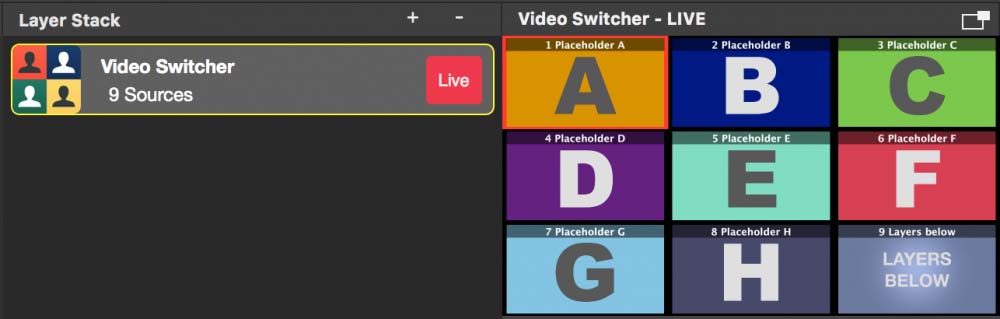 mimoLive’s video switcher layers and preview window
Keep these simple steps in mind as you set up your studio for multi-cam live streaming.
Multiple cameras make the types of shooting on site highly diverse.
Connect the camera to yourMcDonald'sVia HDMI grabber, cool like thisMagewell® USB Capture HDMI 4K Plus
Mlet-WolfsburgGiving you a professional video switcher and encoder for Mac that controls your camera and a microphone hub.