

EMI is usually caused by high-frequency current flow; in switch-mode buck converters, how to mitigate electromagnetic interference (EMI) is a common topic. Star Vision Company will first share: EMI problems caused by input current, and propose corresponding solutions, as well as more ways to reduce EMI.
1. Causes and solutions of EMI
In switch-mode buck converters, electromagnetic interference (EMI) is mainly caused by high-frequency current flowing in the circuit loop.
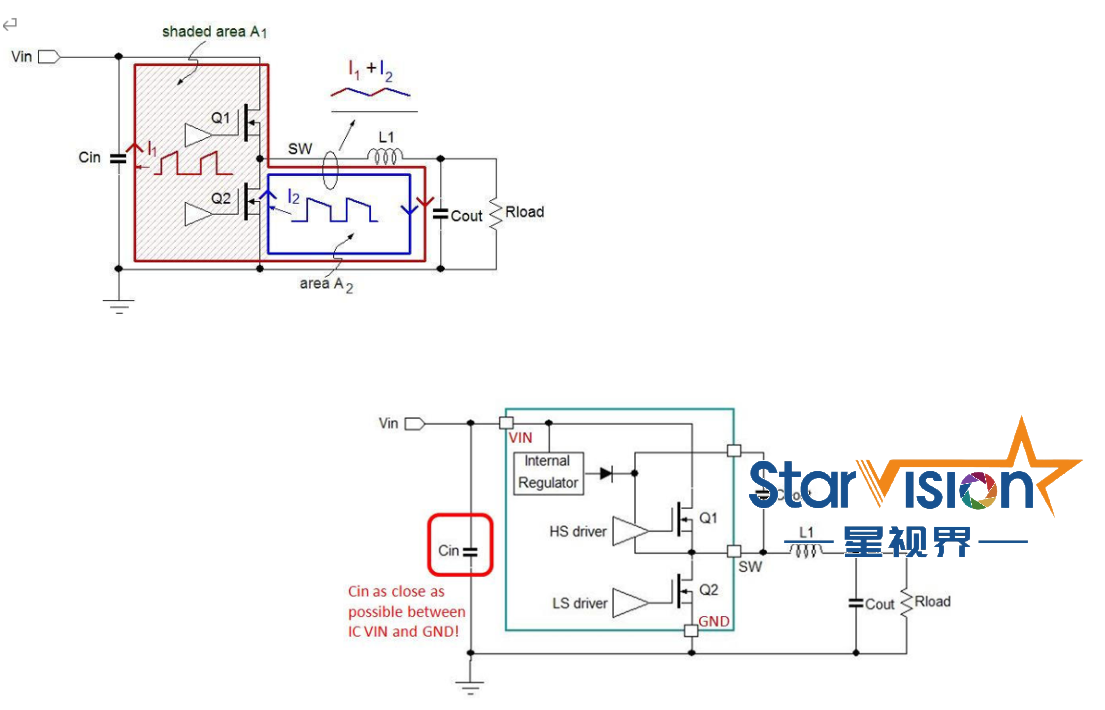
Figure 1
The input current I1 has a very high dI/dt and may produce significant electromagnetic interference (EMI) over a wide spectrum. As shown in Figure 1, area A1 should be minimized as much as possible. Cin should be placed as close as possible between the VIN pin and GND pin of the IC, see Figure 2 for details.
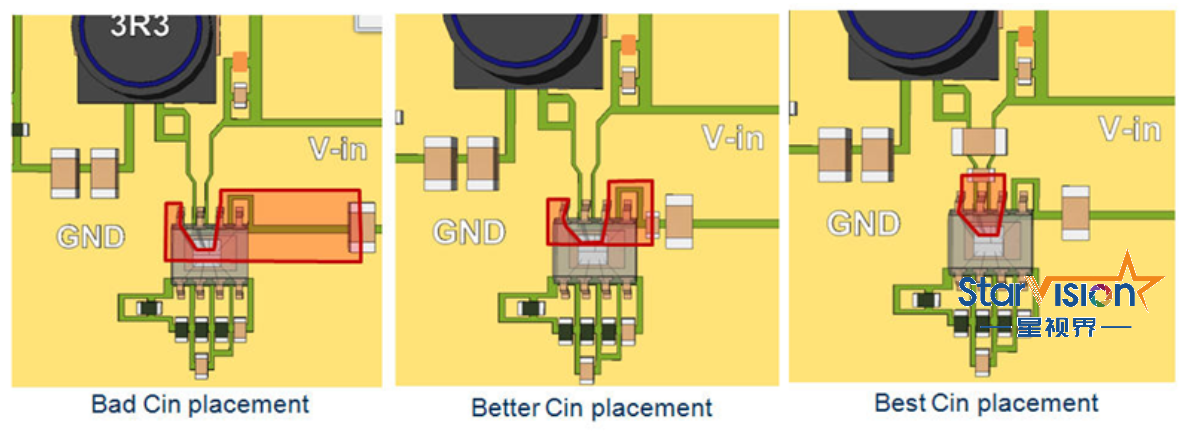
Figure 2
2. Other ways to reduce electromagnetic interference in buck converters
As shown in Figure 3, a resistor is connected in series between Cboot and Rboot. Rboot reduces the switch drive current of Q1, which increases the rise time of the switching waveform, thus reducing the higher harmonics of the switching current. The value of Rboot depends on the size of the high-side MOSFET. For most applications, around 5 ~ 10Ω is typically used. For smaller (higher Rdson) MOSFETs, larger Rboot values are allowed. Note that slow switching of the MOSFET switches will increase switching losses and reduce efficiency.
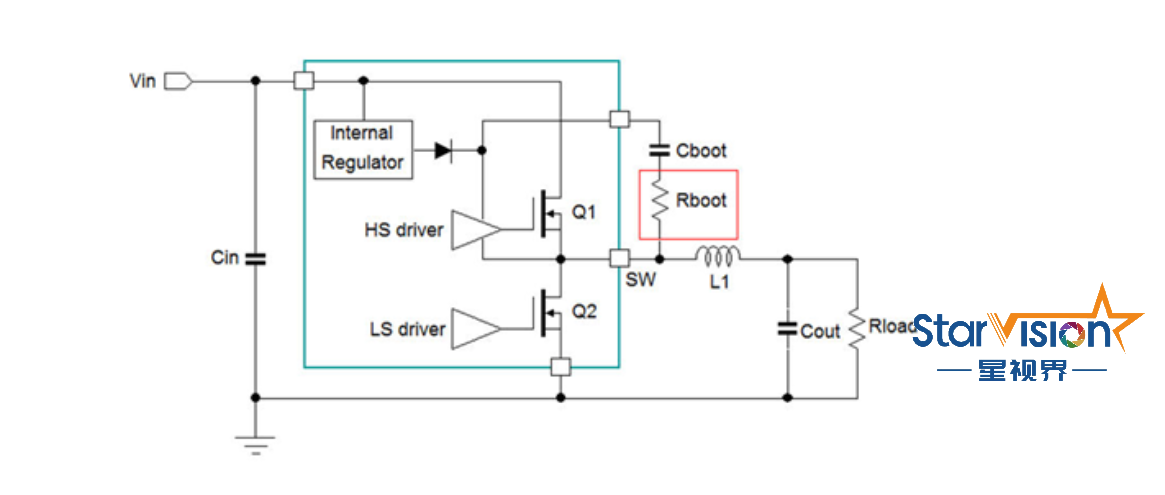
Figure 3
If possible, place the RC suppression circuit as close as possible between the switch node and power supply ground. Rs will suppress the parasitic resonant LC circuit consisting of the MOSFET capacitance and the parasitic inductance of the switching loop, as shown in Figure 4. The optimal value of Rs depends on the total switch node capacitance and parasitic inductance. Rs typically ranges from 2.2Ω to 10Ω. The series capacitor Cs is selected to be 3 to 4 times the parasitic capacitance of the circuit. Usually, 470pF ~ 1nF is enough. After placing the RC suppression circuit, be sure to check the total power consumption of the circuit: converter efficiency will decrease, especially at high switching frequencies and high input voltages.
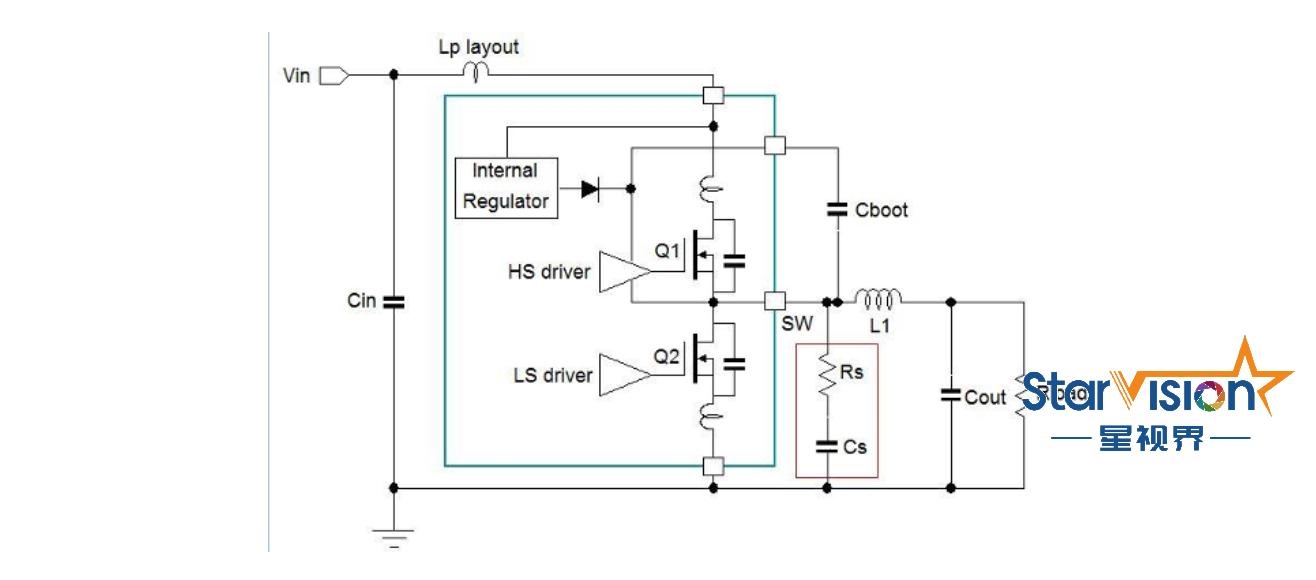
Figure 4
As shown in Figure 5, connect the RL suppression circuit in series with the resonant circuit. This will add a small amount of series resistance to the resonant circuit, enough to provide some damping. Ls can be a very small high frequency ferrite bead such as the BLM15AX100SN1 or BLM15PG100SN1 and must have sufficient input RMS current rating. Rs typically ranges from 2.2Ω ~ 4.7Ω. The RL suppression circuit must be placed close to the power stage input node to keep the input loop small enough. One disadvantage of the RL suppression circuit is that it creates an impedance Rs in the high frequency region of the switching loop. During very fast switching transitions, the switching current pulse will produce a brief voltage glitch on Ls//Rs, resulting in a small voltage glitch on the power stage input node. After adding the RL suppression circuit, be sure to check for voltage glitches on the IC VIN node at maximum load switching.
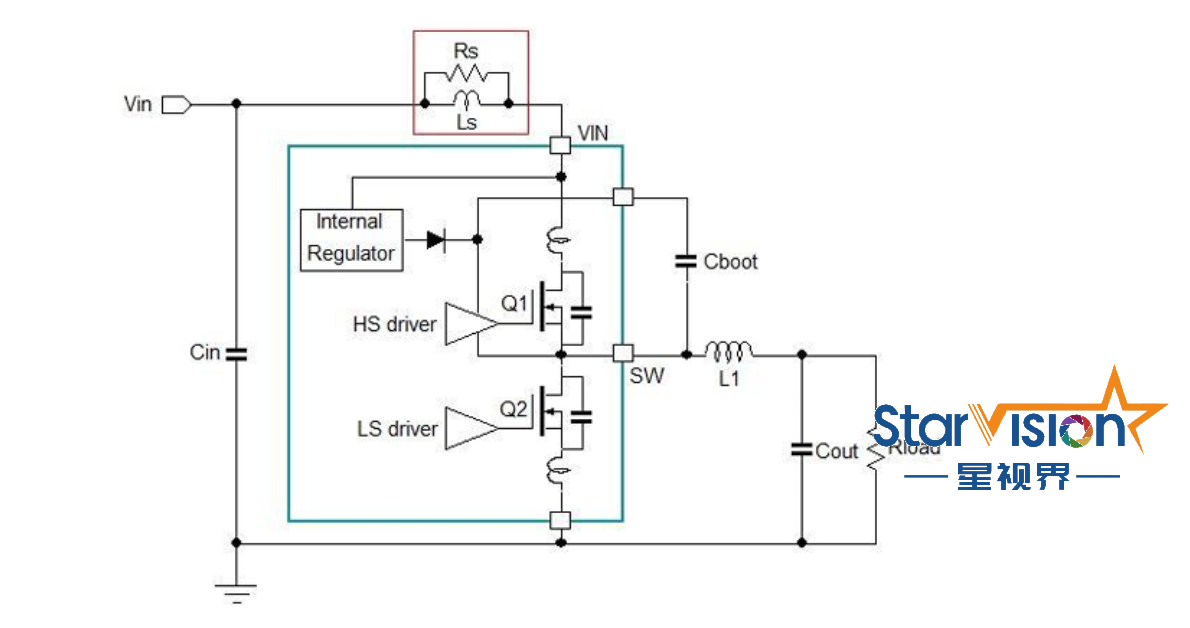
Figure 5
Input filtering is very important to reduce EMI. To reduce the voltage drop across Cin, use a low ESR MLCC type and use multiple capacitors of different sizes, like 2x10µF 1206 and a 22n ~ 100nF 0402 or 0603 size type close to the buck IC. To reduce noise in the input loop, it is highly recommended to add additional L-C filtering to the input line. When using a pure inductor for L2, it may be necessary to add electrolytic capacitor C3 to suppress any input supply ringing and ensure a stable input supply.
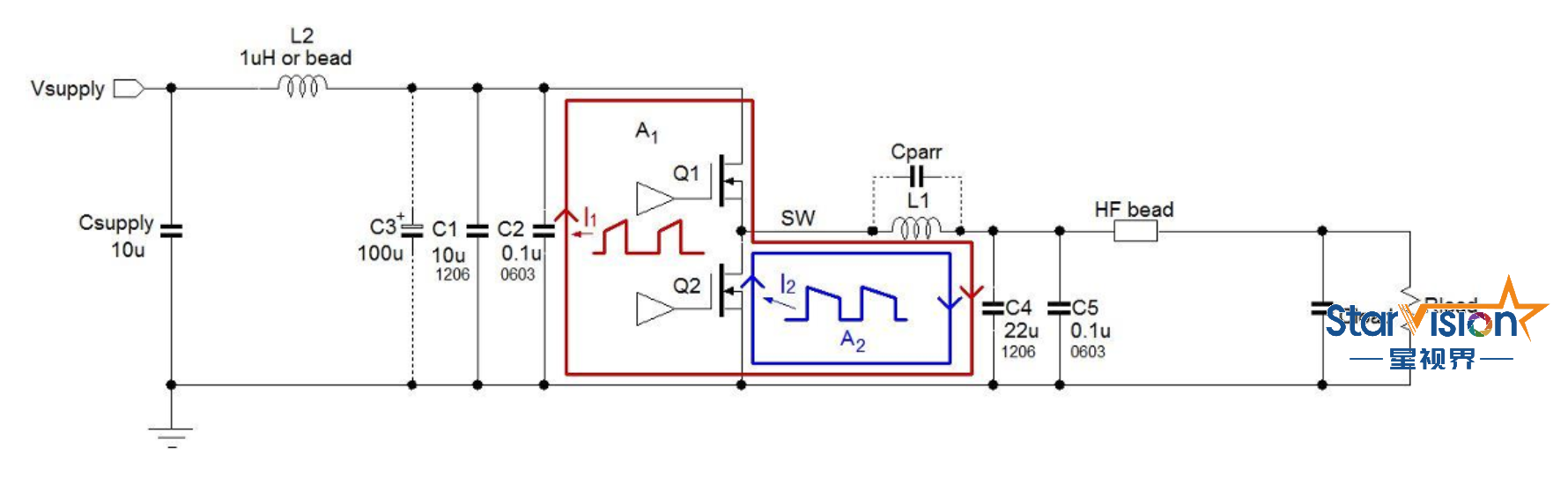
Figure 6
3. Make your own simpleSingle EMI measurement tools
We can use a small loop antenna to make near field EMI measurements on the PCB. It is easy to make a small electrically shielded loop antenna yourself using a thin piece of 50Ω coaxial cable: see Figure 7.
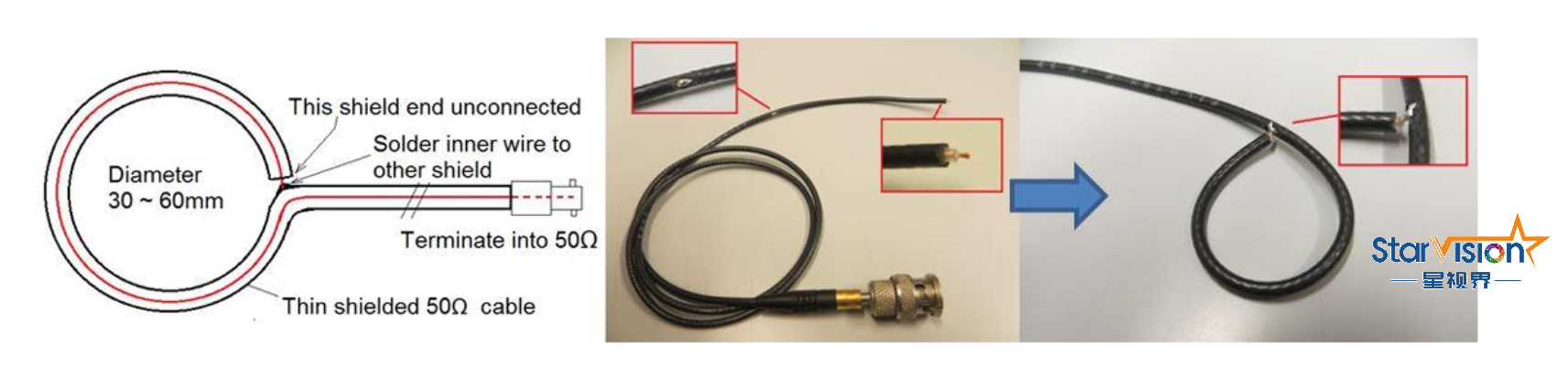
Figure 7
A loop antenna can be connected to a spectrum analyzer. By moving the loop antenna over the application PCB, you can see which areas emit significant amounts of high-frequency magnetic fields. You can also connect the loop antenna to an oscilloscope (terminated to 50Ω) and the oscilloscope will show the switching noise level in certain areas of the PCB. By keeping the loop antenna at a fixed distance and position, the circuit/PCB loop is changed and it can be checked whether the radiated noise level increases or decreases.
High frequency currents in the converter input lines are a good indicator of radiated EMI. A high frequency current probe can be made by threading several turns of coil through an EMI core: these will form a high frequency current transformer. The method is similar to that of a loop antenna, but the loop coil needs to be passed through the core three times. See Figure 8
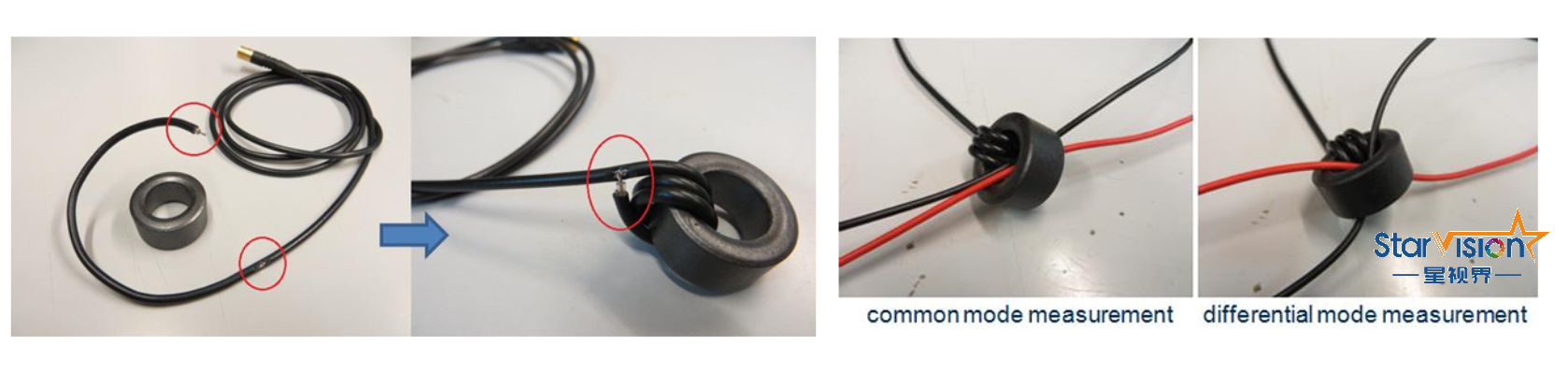
Figure 8
The high frequency current in the cable can now be measured by passing the cable through the core. The current transformer output can be connected to a spectrum analyzer or oscilloscope (terminal). To avoid the flow of common-mode currents from the device under test to the measuring device, it is recommended to add a common-mode inductor to the cable: this can be achieved by passing the cable leading to the analysis device several times through a snap-on EMI core. The input common-mode measurement is shown in Figure 9.
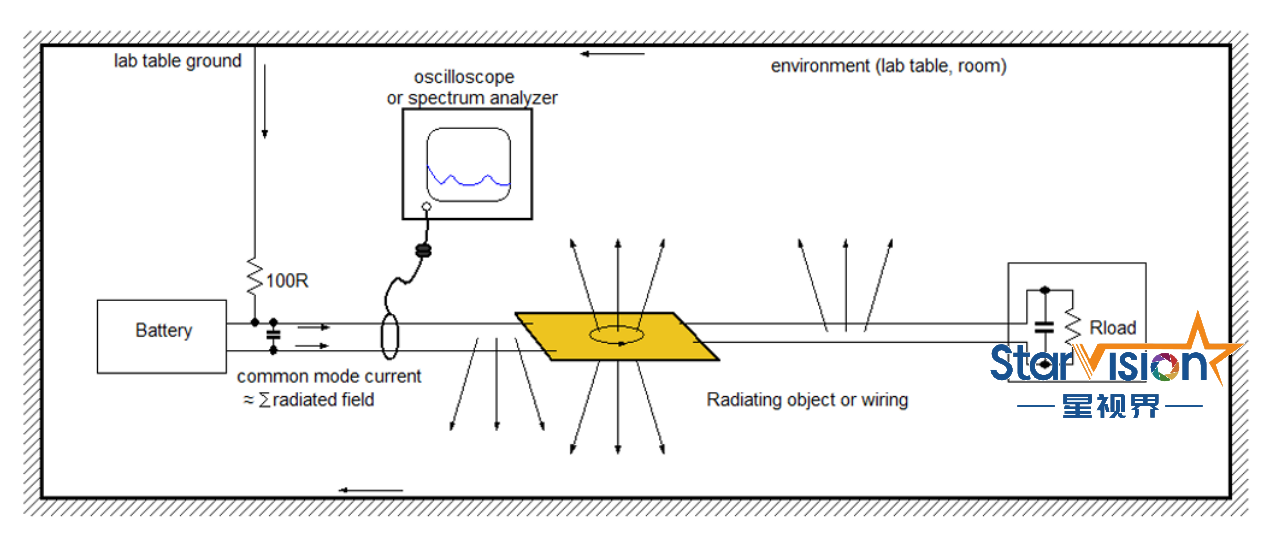
Figure 9
►Scenario application diagram
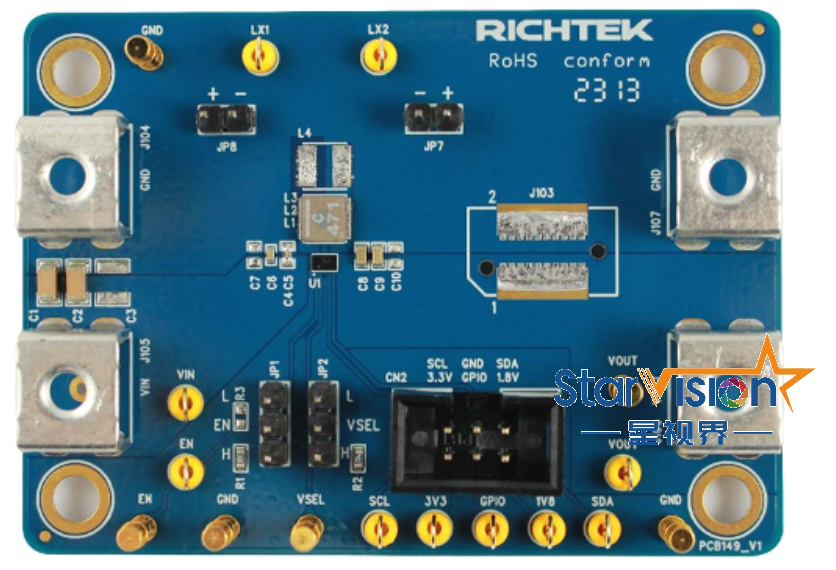
►Display board photo
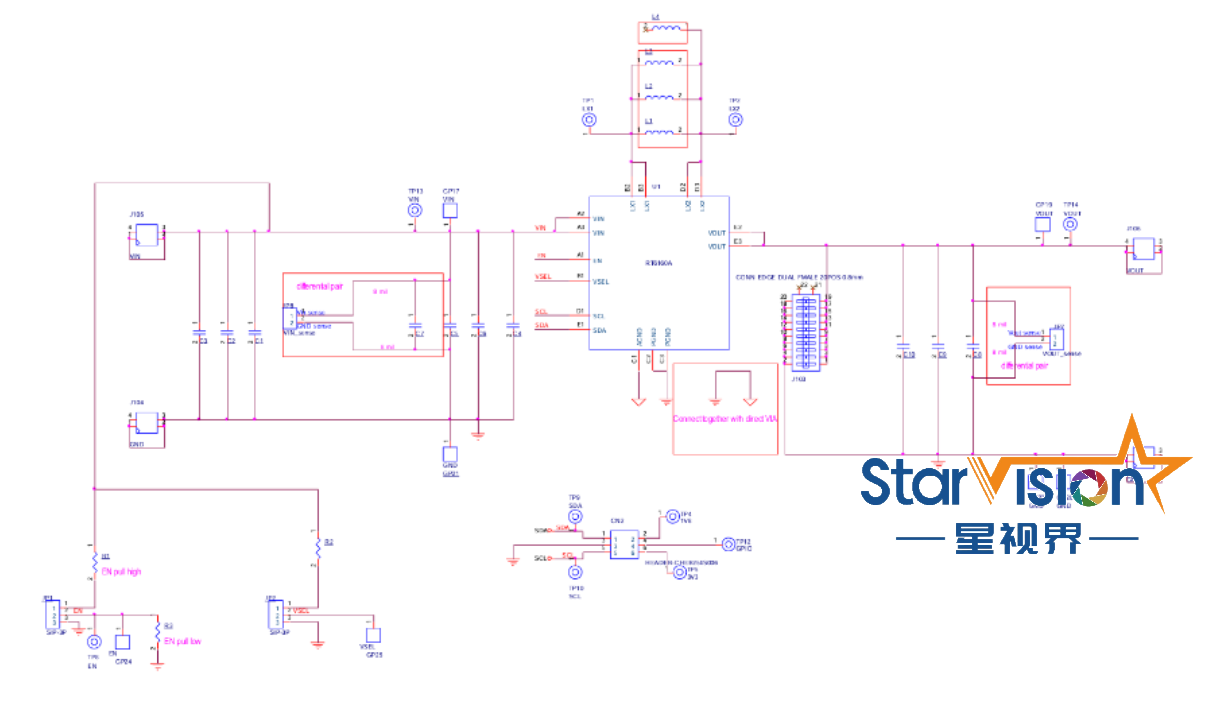
►Solution block diagram
►Core technology advantages
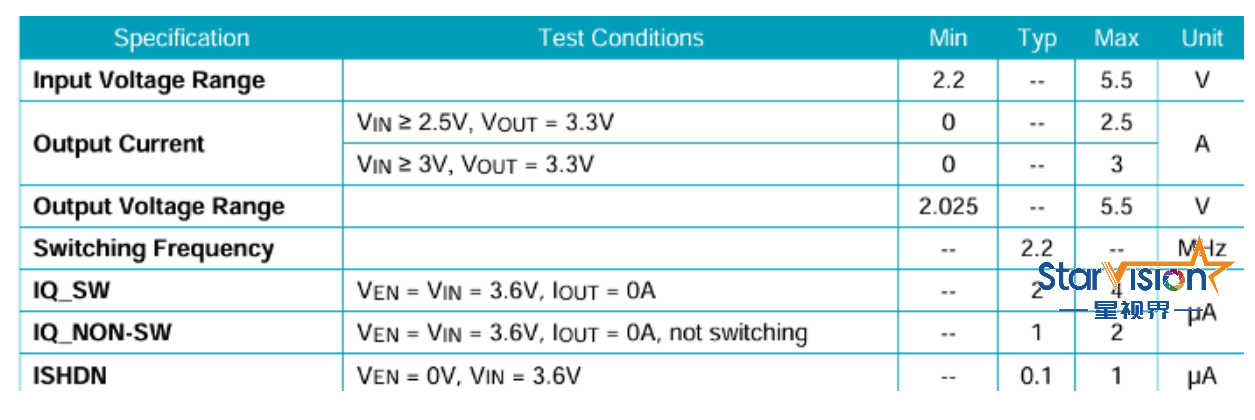
The RT6160A is a high-efficiency, single-inductor, advanced constant-on-time (ACOT) monolithic synchronous buck-boost converter that delivers up to 3A output current from 2.2V to 5.5V. It can regulate digitally programmable output voltages from 2.025V to 5.2V very well, making it suitable for a wide range of input power applications, whether the input voltage is lower than, higher than or even equal to the output voltage. The ACOT control architecture provides excellent line/load transient response, transitions seamlessly between buck and boost modes, and provides stable operation with small ceramic output capacitors without the need for complex external compensation. RT6160A has an I®®2C interface that supports programmable output voltage, ultrasonic mode control, soft-start slew rate adjustment and device status monitoring. The target output voltage can also be switched through the external VSEL pin to perform dynamic voltage scaling (DVS). The ramp slew rate and ramp mode of DVS can also be set by configuring the relevant registers. The RT6160A operates with automatic PFM and is designed with a low quiescent current of 2µA typical to maintain high efficiency during light load operation. At higher loads, the device automatically switches to 2.2MHz fixed frequency control, easily eliminating switching ripple voltage through small packaged filter components. And the integrated low RDS (on) power MOSFET has excellent efficiency under heavy load conditions. In shutdown mode, the supply current is typically 0.1μA, which is excellent at reducing power consumption. If a fixed frequency is required, PFM mode can be disabled. The RT6160A is available in the small WL-CSP-15B 1.4x2.3 (BSC) package.
►Project specifications
1) Output selection. RT6160A has an external VSEL pin for selecting VOUT1 or VOUT2. Pulling VSEL high is for VOUT2 and pulling VSEL low is for VOUT1. 2) VOUT selection. The RT6160A has a programmable VOUTX[6:0] register and output voltage from 2.025V to 5.2V with 25mV resolution. VOUT1 address = 0x04, VOUT2 address = 0x05. 3) After powering off, connect the input power to the VIN and GND pins. 4) After powering off, connect the electronic load between VOUT and the nearest GND pin. 5) Turn on the power supply at the input end. Make sure the input voltage stage does not exceed 5.5V on the evaluation board. 6) Pull the RT6160A En pin high to enable the device, i.e. the switch is enabled and the soft-start sequence is initiated. It is recommended to first raise the VIN voltage higher than VUVLO, then the EN voltage rises higher than Logic High Threshold Voltage (VENH) The device will turn on. 7) Verify the output voltage VOUT. If VSEL = H, the default output voltage measured by RT6160A is 3.45V; if VSEL = L, the default output voltage measured by RT6160A is 3.3V. Check that the output voltage is correct, using a voltmeter. 8) Once the appropriate output voltage is established, adjust the load within the operating range and observe performance such as output voltage regulation, ripple voltage, efficiency, etc.